Keyboard heatmap
Maybe you’re a developer and you use the keyboard excessively for vimming. Maybe you are a hardcore gamer. Either way, if the shortcuts setup is suboptimal, your wrist might start to hurt.
Outline (not clickable, just ctrl+f for stuff)
- Writing a keylogger or why was X server a mistake
- Wayland and evdev
- Heatmap GUI in Java Swing
good source to check https://tronche.com/gui/x/xlib/ (to continue writing)
I use Neovim (btw) and a tiling window manager and I work as a programmer. It means that my workflow heavily relies on the use of the keyboard. I have lots of keyboard mappings, some of those use multi-finger chords, which puts a lot of stress on my fingers.. Soon enough, my wrist started to hurt. There are many reasons for this: suboptimal keyboard, not taking breaks during work, not getting enough exercise. But I am a programmer, so instead of fixing the real problem, I decided to cure symptoms and solve all my problems with code. I wanted to find the optimal layout for my shortcuts. Thus, a keyboard_heatmap project was born.
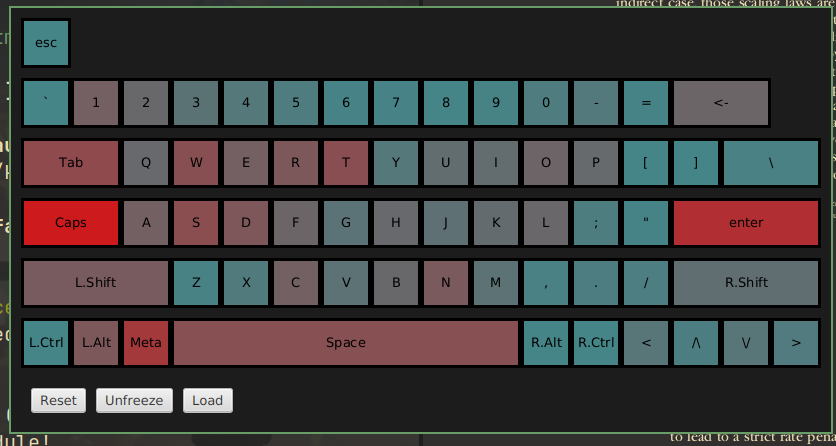
Writing a keylogger or why was X server a mistake
To draw the heatmap of how often each key is pressed, you need to record each key press. Essentially, you need to write a keylogger (though you could use an existing one—but where’s the fun in that?). When I started the project I was using GNOME running on X server, so that’s where I started.
It is surprisingly easy to write a keylogger in X — which seems like a security risk, but is very fortunate for my pet project. Did you know that every app running on the X server has access to all the keyboard events? Even when it’s not focused, even when it’s running in the background. That seems like a horrible idea and was enough of a reason for me to switch to wayland, but luckily for the project it makes implementing the keylogger really straightforward. I’ve written a simple, 150 lines program to do so. There’s no comments, because I was planning to write this article anyway (trust).
First of all, to compile it you need to install several libraries. On Fedora they are: libX11-devel, libXi-devel. And to compile you need to link them: gcc -lXi -lX11 x11_key_counter.c -o x11_keylogger.out.
Let’s go over the code.
The main function is really simple. We use Xlib library to connect to X display, set up a keyInfo structure to track key presses, do some preparation magic with in init_select_event and finally enter key-listening loop, where we continuously gather data about key presses and dump all info once a “stop” key was pressed (which, in this case, was hardcoded to escape).
#include <X11/X.h>
#include <X11/Xlib.h>
#include <X11/XKBlib.h>
#include <X11/extensions/XI2.h>
#include <X11/extensions/XInput2.h>
// <...>
int main() {
    Display *dpy;
    int opcode;
    init_display(&dpy, &opcode);
    KeyInfo *keyInfo = set_keyinfo(dpy);
    init_select_event(&dpy);
    event_loop(dpy, opcode, keyInfo);
    return 0;
}
In init_display we connect to X display via XOpenDisplay. Passing NULL means that the value of the environment variable DISPLAY will be used. We also check if necessary functionality is available for the running X server via XQueryExtension and XIQueryVersion.
void init_display(Display **dpy, int *opcode) {
    *dpy = XOpenDisplay(NULL);
    int event, error;
    if (!XQueryExtension(*dpy, "XInputExtension", opcode, &event, &error)) {
        printf("X Input extension not available.\n");
        exit(1);
    }
    int major = 2, minor = 0;
    if (XIQueryVersion(*dpy, &major, &minor) == BadRequest) {
        printf("XI2 not available. Server supports %d.%d\n", major, minor);
        exit(1);
    }
}
In init_select_event we set XIEventMask, telling which events to listen to. These events can include key or mouse presses/releases, focus changes, window state notifications, and so on. In the case of this simple keylogger we are only interested in the key presses/releases.
void init_select_event(Display **dpy) {
    XIEventMask eventmask;
    unsigned char mask[(XI_LASTEVENT + 7) / 8];
    memset(mask, 0, sizeof(mask));
    eventmask.deviceid = XIAllDevices;
    eventmask.mask_len = sizeof(mask);
    eventmask.mask = mask;
    XISetMask(mask, XI_KeyPress);
    XISetMask(mask, XI_KeyRelease);
    XISelectEvents(*dpy, DefaultRootWindow(*dpy), &eventmask, 1);
}
event_loop simply listens for the specified events in an infinite loop. We work with the Xevent structure, and we extract its data as XGenericEventCookie. On each key press and key release we update our keyInfo data structure, tracking the number of key presses and the duration each key was held.
void event_loop(Display *dpy, int opcode, KeyInfo *keyInfo) {
    XEvent ev;
    for (;;) {
        XGenericEventCookie *cookie = &ev.xcookie;
        XNextEvent(dpy, &ev);
        if (cookie->type != GenericEvent || cookie->extension != opcode) {
            continue;
        }
        if (XGetEventData(dpy, cookie)) {
            switch (cookie->evtype) {
            case XI_KeyPress:
                {
                    XIDeviceEvent *keyEvent = (XIDeviceEvent *)cookie->data;
                    update_keyinfo(keyInfo, keyEvent->detail, 1);
                    break;
                }
            case XI_KeyRelease:
                {
                    XIDeviceEvent *keyEvent = (XIDeviceEvent *)cookie->data;
                    update_keyinfo(keyInfo, keyEvent->detail, 0);
                    if (keyEvent->detail == ESCAPE_KEYCODE) {
                        print_all_keyinfo(keyInfo);
                    }
                    break;
                }
            }
            XFreeEventData(dpy, &ev.xcookie);
        }
    }
}
As a result of print_all_keyinfo you get output like this:
{
Keycode: 9      Label: Escape   TotalTime: 138  Counter: 1
Keycode: 12     Label: 3        TotalTime: 124  Counter: 1
Keycode: 17     Label: 8        TotalTime: 69   Counter: 1
Keycode: 18     Label: 9        TotalTime: 161  Counter: 1
Keycode: 19     Label: 0        TotalTime: 405  Counter: 4
Keycode: 22     Label: BackSpace        TotalTime: 127  Counter: 3
Keycode: 23     Label: Tab      TotalTime: 382  Counter: 4
Keycode: 24     Label: q        TotalTime: 90   Counter: 1
Keycode: 25     Label: w        TotalTime: 979  Counter: 8
Keycode: 26     Label: e        TotalTime: 266  Counter: 3
Keycode: 27     Label: r        TotalTime: 761  Counter: 7
Keycode: 28     Label: t        TotalTime: 533  Counter: 5
Keycode: 30     Label: u        TotalTime: 219  Counter: 2
Keycode: 31     Label: i        TotalTime: 1582 Counter: 13
Keycode: 32     Label: o        TotalTime: 320  Counter: 3
Keycode: 33     Label: p        TotalTime: 51   Counter: 1
...
}
This was enough to visualize everything I needed and wrap up the project. Also, the fact that it was this easy to write a keylogger was enough of a reason for me to switch to Wayland, so I did. Naturally, I had to find a new way to implement the keylogger under Wayland. As expected, it’s a little bit harder on Wayland.
Wayland and evdev
Before explaining how I changed stuff, I’ll give you the end result. I’ve rewritten the keylogger in C++ with libevdev. Running the keylogger now requires sudo and requires determining which device needs listening to. You can view the file in the master branch. And it’s actually shorter then the X-keylogger version, with only 149 LOC.
But why did I chose to use evdev? To understand that, let’s explore how the keyboard events are processed in both X and Wayland. Keep in mind, that I want my tool to be cross-platform.